16 minutes
Written: 2026-04-07 00:00 +0000
LLM Development at Enterprise Scale
This is a talk I gave at a company on-site turned into an article. Expect it to be lengthy and less suitable for a non-technical audience after the introduction. The article is intended for new developer onboarding, detailing a range of infrastructure considerations, and a guide to working with LLMs for enterprise development.
Introduction
My background was in chemical engineering. That is a discipline that only exists because of the limitations of chemistry at scale. What scientists discovered was that a novel discovery in a test tube could easily become a lethal explosive at scale if factors like enthalpy (reaction heat) and transport phenomena aren’t accounted for. This is true in the world of chemistry and it is also true in the world of bits. One dev’s code that works nicely on their machine can become a production breaker if the large scale implications are not properly taken into account.
A formative book set for me was Donald Knuth’s Art of Computer Programming. An old book from the 60s that details algorithmic optimizations pertaining to assembly like machine code. When your hardware is measured in bytes, every drop of performance is essential. 50 years later little has changed. Development is still resource starved. Whether because of increasing consumer expectations, the advent of big data, or the new GPU based endeavors, there’s always a hardware wall to run into. The primary change since then is in the form of broadly distributed systems, which lead to a new set of challenges themselves.
Here at [Current Company] we deal with all of these challenges. Hardware constraints at scale, GPU performance limits, complex enterprise environments, you name it. We are a very lean team so all developers need to at least be aware of these concepts. There isn’t going to be a long code handoff process where devs hand it off to an ops team that enables scale and performance who then hand it off to another team for debugging and QA. Especially with the power of modern AI tooling, the scope of care for development has greatly increased. Even with LLM support, devs still need to internalize the fundamentals so that they can produce efficient code with the full deployment implications in mind.
Microservices
We primarily operate microservice based deployments. Leveraging isolated containers, this is generally the best way for us to solve problems. I’m not inherently opposed to monolithic architectures, but it tends not to be the preference of our clients, or suitable to our distribution needs. Monoliths work well for a while, but they tend to rely on predictive steady loads, and long term capacity planning. This isn’t particularly suited to modern work, or client expectations. That said, microservices come with their own set of challenges that need to be addressed.
Microservice challenges stem from replication. Developing for a monolith, or even local microservices you are typically only running a single instance that runs at steady state. This means that there are no concerns with idempotency, db locking, or observability among other things. Any microservice that modifies a DB is particularly vulnerable to these issues, and so as you develop it’s good to keep in mind what it looks like when you have multiple containers attempting to process jobs and edit records that can conflict with each other.
A proper microservice is developed with these scaling challenges in mind, and clearly commits to a contract that allows it to integrate with other microservices. This enables individual pieces of the platform to be versioned and rolled out without disrupting other operations.
We have particular challenges with CloudRun, which is one of our primary microservice deployment paths right now, for better or for worse. CloudRun adds additional problems due to the potential efficiency savings. Scale to 0 leads to cold start challenges, where the container may be considered live, but may not be fully responsive, this can cause particular issues with authentication and token management on startup. CloudRun also enables CPU throttling for unused instances which can play havoc with background processes that are intended to be long running. It’s also generally inadvisable to rely on CloudRun local filesystems for persistence, introducing the need for more of a central storage solution, for which there are various tradeoffs. If you know your service is going to CloudRun all these pieces need to be accounted for.
Resources and Constraints
Latency Hierarchy
- CPU cycle ~1ns
- RAM ~100ns
- SSD read ~100μs
- Local DB query ~1ms
- Same-zone network hop ~0.5ms
- Same-region hop ~5ms
- HDD ~10ms
- Cross-region ~50-100ms
- Cloud storage (GCS/S3) ~50-200ms
- Cross-cloud / internet ~100-300ms
All numbers very approximate. This hierarchy is the fundamental piece to pay attention to for latency in system design. Each microservice a workflow touches is going to add a latency hit to the total process. A series of poorly designed microservices can lead to backbreaking total latency. This is especially true as you start hitting the cloud storage layer for these distributed microservices. You may not need to worry day to day about 1ms and lower processes, but if 200ms processes are carelessly added in the system will suffer. It’s about understanding the topology of the actions your workflows are taking. Which parts are being touched, what data volumes are flowing over which pathways, etc.
Device
A brief overview of device components and how you’ll see problems originate.
- Memory
RAM has an allocated maximum limit, after which there is a hard failure. For distributed container execution this is less of an issue as only the individual container will fail. If it is on a central process memory issues are much more serious. Repeated memory failures on a central process can cause cascading failures.
- CPU
The processor, of which there are multiple threads. A process that consumes too much CPU will start to throttle rather than have a hard failure. This starts to spike latency, but may not lead to hard failure, although long term throttling of CPUs, like in CloudRun, can have unanticipated errors start to occur. Particularly this is where dangerous race conditions can occur.
- Disk (Storage + IOPS)
Disk has two failure modes. Everyone has seen failures from a drive filling up. This is a hard failure that impacts the entire service using that disk. Always important to understand the max file commitments taking place and having a plan to support it. The other failure mode is IOPS based, essentially too high of a read/write volume from the disk that leads to throttling analogous to the CPU issues.
- Ports
Ports ranging from 0-65535. It sounds like a lot, but poor usage from a single device can cap it out. A more likely issue to consider is port conflicts. Generally not something a developer should encounter every day, but good to be aware of.
- GPU
GPU optimizations and performance limitations are beyond the scope of this article, but could certainly be topics on their own.
Network
- Connections and bandwidth
Especially when going through network boundaries. i.e. internal to internet, cross cloud, on-prem connections. NATS and other gateways tend to have connection limits and throughput limits. This is a particularly dangerous area when coming from local testing. Spinning up 100s of connections by accident locally can be missed, and this is extremely detrimental to system performance. Monitor your connections, and ask for LLM review on this specifically. Connections can lead to hard failures, and bandwidth overconsumption can lead to service degradation.
- Network boundaries
As above, the network limitations become particularly pronounced over network boundaries. You should always know when your code will be crossing these boundaries. As a specific example, an internally routing CloudRun has to cross an internal VPC connector, the VPC itself, and then through the NAT to reach the internet. The internal VPC connection especially requires sizing around the connection and traffic volume. It’s also a particularly bad situation on prem.
- Addresses
There’s a finite number of ip addresses available. IPV4 addresses are restricted based on vpc size. Not a common dev issue, but if you are spinning up large volumes of networked containers you may start to see this issue.
Data & Storage
- SQL
There’s a world of difference between a local db that only you are working with and a production DB balancing multiple loads. Especially when you have multiple connections going on at once. Concepts like locking need to be made fully robust. Both to prevent simultaneous writes, and to handle failure of the locking service.
- Cloud Pricing
Everything in the cloud uses some system of micro-billing. If you are interacting with a service you should try and get a sense of what it is going to cost at scale. Generally storage buckets are cheap, and more niche services are pricier. Some can get really out of hand. The cloud always lets you throw money at problems, but just because you can doesn’t mean you should.
- View your logs.
Know your logging levels. CloudRun Logs are particularly annoying to view. You’ll end up debugging from your logs eventually, so make sure the logs that your code is producing are sensible and as pleasant as possible to review. You’ll thank yourself later.
Testing
Testing Layers
Especially when we talk about LLM supported development, effective testing is critical. In a modern dev environment, it should be expected that QA is done by the developer first. There’s three layers of testing that should be considered.
- Code only. LLMs write a lot of unit tests for this reason. A passed unit test does not mean the code really works, but it at least shows that something hasn’t gone horribly wrong. Beware LLM generated mock backends.
- Local docker-compose. Thanks to container driven development, a lot of the needed functionality testing can be done locally with a stack of containers. We gave everyone nice laptops, so we expect to see multiple containers with scale testing here.
- Cloud environments. The slow and expensive place to test. Best reserved for true scale testing and specific parts that are not verifiable on the local system.
Unit tests can almost always complete in seconds. Docker testing in minutes. Cloud testing taking even longer.
Iteration Speed is Development Output
Fundamentally, the faster you can iterate, the more reliable changes you can deliver. To that end it’s good to set your system up to iterate as quickly as possible.
- Make use of profiling and tracing for individual steps.
- 0.5s is a somewhat arbitrary standard for a microservice api. If it’s taking longer than that, there should be a good reason why.
- If a non-dedicated API takes meaningfully longer, change the transaction.
- If you see any bottlenecks in your local iteration, that’s a good indication you’ll have problems there at scale.
Effective Docker Design
To aid in iteration speed locally, it’s helpful to have well designed Docker files.
- Small / low library usage. Especially with supply chain concerns out there, the less libraries the better. See the 2026 LiteLLM compromise for one of many, many examples.
- Quick to build. Installs first, then code changes, and other improvements. If you make a small code change there should be no reinstalls. If it has to recompile, consider a non-prod recompilation.
- Fix your library versions. Double edged sword here as this can lead to out of date issues and require more code changes, but you don’t want your libraries shifting too much on you, or suffering from a corrupt latest version.
Involving LLMs
An interaction with an LLM is just the base model + context. The context is made up of the latest message, the system instructions, skills, and history. There’s lots of flavor of the month solutions like MCP, RAG, Skills, Hooks, etc. If you understand these as either context or iteration helpers, you can worry more about the core functionality.
At the end of the day you can think of the LLM interaction like a conversation. Each interaction in the conversation is sometimes called a “turn”. The goal is to use these turns effectively to produce an effective solution to your current problem. LLMs are mathematical spaces, and as such they have a gradient. You can think of it like a golf course. You want to find the right putt that gets into the solution space. As somewhat more of a blind process it may take multiple iterations and forks to get where you want to go.
As you play this strange golf game, it’s good to keep in mind that precision of language matters. You want to make sure you are writing in a way that is well understood by the LLMs. There’s a lot of concepts around prompt engineering, but the simplest version is to talk in a way that will most align the LLM to the solution space. Clear language using specific technical terms. It also helps to use appropriate confidence intervals. “It is” vs “I think it is this” vs “it could be this”. This helps the LLM to evaluate how much it should rely on the inputted terminology.
Working with Models via OODA Loops
There’s a lot of different ways to work with AI models, and what’s being talked about here is only one way. If you have something that works, great. If not, consider this as a basic step solution. An OODA loop is an acronym of Observe, Orient, Decide, Act. It’s a good way to make sure that an LLM is specifically on task in a way that you want before changes start occurring.
- Break down the problem - describe it, use model-aided diagrams and research to help you conceptualize the problem space.
- Identify the target issue space - use follow-up questions, and verification tests
- Identify possible solution paths - ask questions, decide for yourself
- Implement the fix
- Validate - small tests, profiling, larger tests, repeat
Know when to break the loop. Some models can produce an endless stream of nitpicks, especially on code that was not previously written to their standards, or in large enough applications where there’s always something. You have to be able to know when to call it good enough and ship. This is where the right levels of testing comes in. An imperfectly happy model with complete use case tests is generally a good place to be.
Model Selection
Generally for development applications you want to have a model that maximizes intelligence and problem solving ability. This generally puts you on track to use one of the frontier models, but there are open models that can at least be considered. The best model changes all the time, and each generation may have different pros and cons. You can think of a model as a tool that has a shape to it. You want to use the right tool for the right shaped problem.
Claude
Anthropic’s model set. Referring here specifically to Opus 4.6. I would not suggest any of the smaller Haiku or Sonnet models for dev work.
Now with 1M context. Ultrathink no longer by default (a previously autoflagged extended thinking, now requires the user to include the word “ultrathink”). Somewhat of a strange choice for a development tool. Claude Code is now better suited towards supportive tasks that benefit from a high context but a low complexity. You can think of it like having several interns available. It’s easy to prompt and people seem to like the rapport it establishes with the human. It tends to need fewer turns to get the job done, and uses a lot of tokens on its own. Great for “run this test and review the result”, but dangerous for high risk code changes. Expect to create serious issues if you are pushing unreviewed code. Allowing it to brute force solutions is particularly dangerous as the Opus 4.X models especially have a tendency to fudge tests and mocks to call a task “done”.
GPT
OpenAI’s model set. They have some naming challenges. GPT5.3-Codex was the prior best specialized coding model, but now (most find) 5.4, a generalist model, to be the better code writer. Like Anthropic, there are mini models, but they are unsuited to code.
GPT 5.4, which has to be specially set to xhigh thinking, is a very impressive model. It’s a pedantic engineer that can be somewhat tricky to prompt properly. A tendency to get lost in the weeds and forget about the big picture. It requires more turns and higher user engagement, but it does require fewer tokens to accomplish complex tasks. It’s very slow and has a tendency to produce a lot of code bloat. The code bloat often isn’t wrong in the sense that it technically makes sense to have certain checks and refinements, but isn’t how a human would do it. A typical 5.4 failure state is a large code change that adds several layers of checks and error prevention steps, that still fails to solve the real problem.
Internally we expect devs to make use of both Claude and GPT and understand the best place to involve each.
Open Models
Kimi, GLM, etc. There are a lot of open model competitors, some open source, some only open weight, that offer cost effective performance. For specific applications they can be further fine tuned for task specific optimization.
Significantly cheaper models with near Opus like performance. They have less enterprise-friendly hosting options. They tend to combine the flaws of Claude and GPT while being heavily focused on benchmarks that may not perform as well in multi-turn states.
Model Collaboration
These models can be used to collaborate with each other. There’s the concept of Gastown (don’t use this) and the LLM agent council. You can also just have Claude instructions to call GPT for complex problems. You can set up fully autonomous workflows, and consensus modeling. I don’t suggest doing any of that right now. It’s bad value and bad for learning. Without proper human support you can easily have 10x+ the token usage with worse results. In the current generation, as a developer you are still responsible for the code the model puts out. You have to read the words that are on your screen and make sure that you are aligned with the direction the model is going.
Effective Collaboration Tools
https://missing.csail.mit.edu/
Apparently there’s a new 2026 edition of MIT’s Missing Semester class, now with more LLM guidance. To work well with models, and as a developer in general it’s important to understand some of these topics. Git, especially diffs and merge reviews are the foundation of collaborative development, and when collaborating with a model, understanding the diff is even more important. Modal editing tools are also helpful. Simply put, the more you are using keyboards and shortcuts rather than clicking around the smoother your dev process will be. It’s important not to get too stuck in the weeds, but ideally your process of editing and iterating should be low friction.
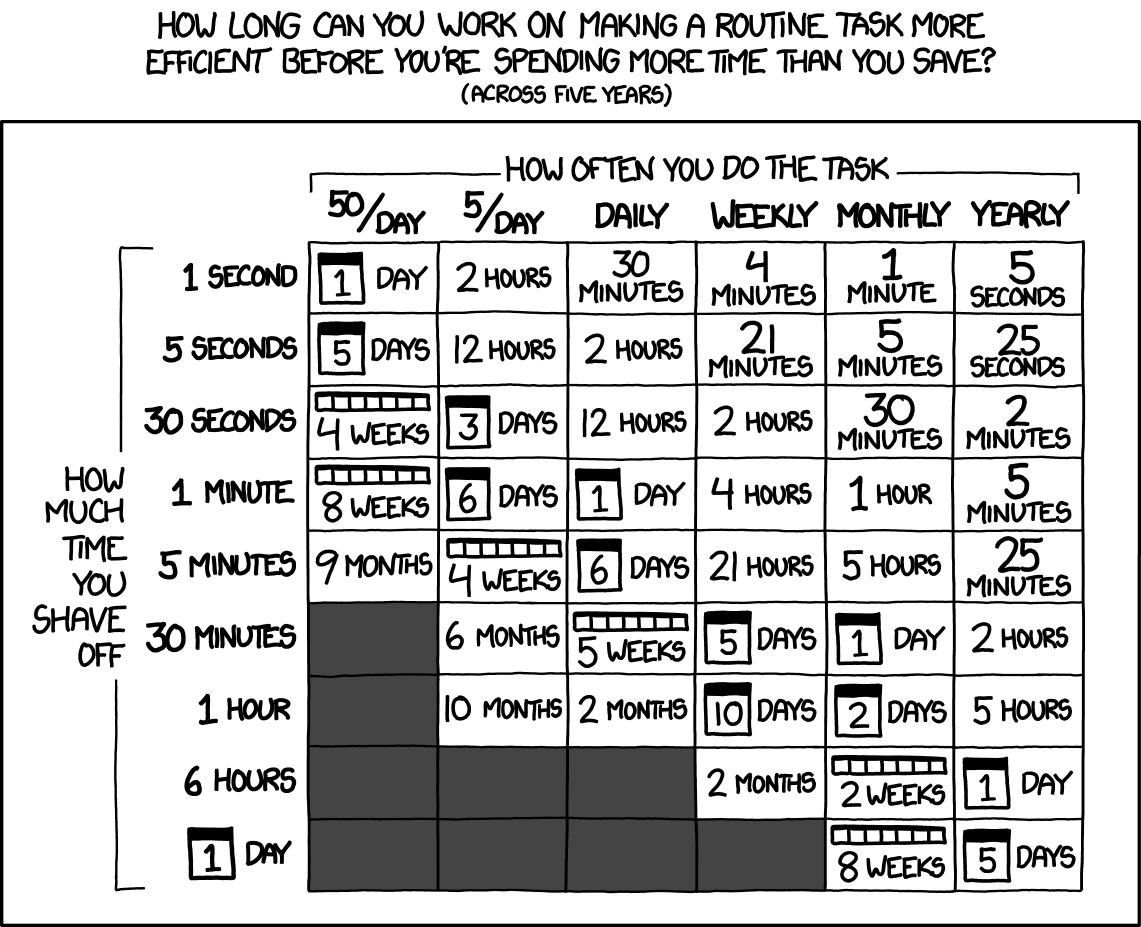 XKCD 1205. Chart applies for 5 years, which is optimistic for a modern dev workflow. Adjust your time commitments appropriately.
The Human in the Machine
As we go over the care and feeding of the machines, it’s good to make sure that the human is looked after as well. Working with LLMs is an exercise in judgment, and judgment is the first quality to decline from impairment. There have been countless studies on the ways sleep deprivation in particular impedes clear decision making in a way that the deprived can’t notice. Sleep and eat well, easy on the stimulants, and keep an open mind. You aren’t trying to pull a slot machine lever to hope the good results come out. You want to understand the craft, and intentionally work towards a goal.
Wrap Up
There’s a lot of moving parts here, each of which is just scratching the surface. Hopefully this helps people to make the transition from siloed code block development, in which your responsibilities end on your device, to the more modern era of LLM powered development for scale. I expect that this won’t be the last edition of this article as if nothing else the models are still rapidly changing. Feel free to reach out with further comments and suggestions for the next edition.